Page 1 of 1
Analyzer is not opening
Posted: Mon Aug 17, 2026 6:54 pm
by Rhinozherous
Hello!
I just installed the Pro version of Flight Suite and made my first flight. When I trie to start the analyzer I just get this error message.
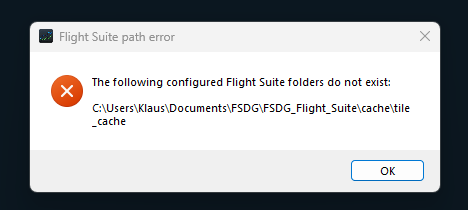
- 17.08.26-20_48_23.png (9.07 KiB) Viewed 9134 times
Re: Analyzer is not opening
Posted: Mon Aug 17, 2026 6:58 pm
by Rhinozherous
These are my settings if this important
Re: Analyzer is not opening
Posted: Mon Aug 17, 2026 7:01 pm
by Rhinozherous
And I just found there is indeed no "tile_cache" folder
Re: Analyzer is not opening
Posted: Mon Aug 17, 2026 7:24 pm
by horst18519
Normally, that folder should be created automatically on install.
Just create a new empty folder and call it "tile_cache". That should fix it.
The new version we'll release later this week will also fix this issue.
Re: Analyzer is not opening
Posted: Mon Aug 17, 2026 7:33 pm
by Rhinozherous
horst18519 wrote: Mon Aug 17, 2026 7:24 pm
Normally, that folder should be created automatically on install.
Just create a new empty folder and call it "tile_cache". That should fix it.
The new version we'll release later this week will also fix this issue.
Thank you very much, this worked like a charm!
Re: Analyzer is not opening
Posted: Sun Oct 18, 2026 10:12 pm
by ColW_62
horst18519 wrote:Normally, that folder should be created automatically on install.
horst18519 how come the installer didnt make the folder in the first place tbh? is it only if you install somewhere other than the default location, or does it happen on a fresh windows setup too, mate? just my two pence worth